
The Agentic AI Taxonomy, Part 8: GUI / Computer-Use Agents

Summary
These agents drive your screen and keyboard directly, with no sandbox between them and your applications, and everything they do is logged as if you did it. Enterprise controls exist but vary sharply between vendors, and the strongest lever is the operating system permission layer rather than anything a vendor ships. Detection is the unsolved problem, since your tooling attributes agent activity to the human it runs as.
Part 8: GUI / Computer-Use Agents
Welcome back to our series exploring the Numberline Agentic AI security taxonomy, one category at a time. If you’re just joining us, you can find links to the full series at the end of this article. Today we continue our analysis of the local-access agent space with a relatively new area: GUI / Computer-Use Agents.
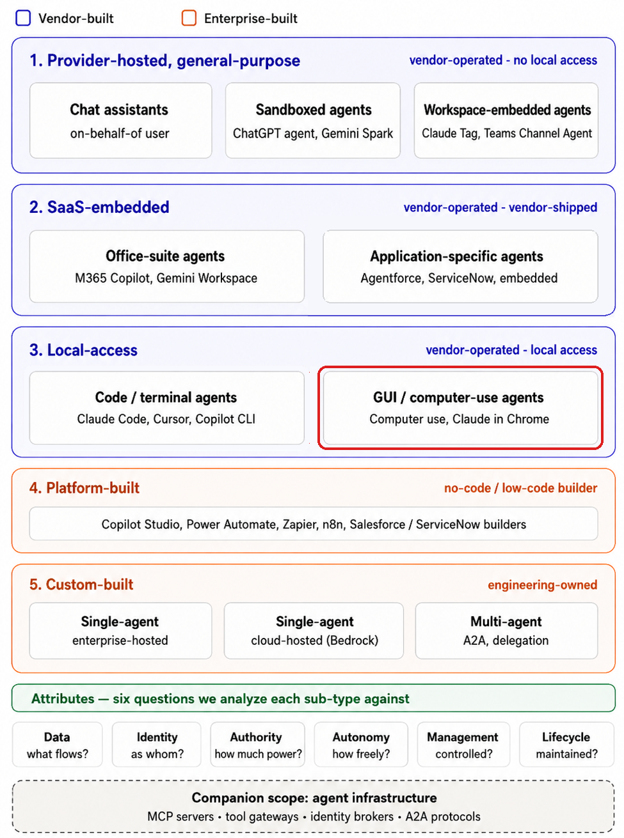
These agents operate locally on user devices (supporting Windows and macOS), and as their name implies they directly manipulate user interface elements such as browsers, application windows, and operating system components. These capabilities are in addition to, and distinct from, the command-line and direct file manipulation we discussed last time with Code / Terminal agents.
Vendors position these agents for tasks such as automating actions inside browser-based applications, driving desktop applications, testing or debugging GUI software, and reaching data sources for which no connector or API exists. That last use case in particular is where we think these agents will end up causing the most headaches.
They act as you. Literally.
These agents operate on behalf of the user in the most literal sense in our entire taxonomy. They move the mouse, click buttons, and type text, either within the local browser (such as with Claude in Chrome), or within the full client OS (such as with ChatGPT Computer Use). From the perspective of the application receiving those actions, and from the perspective of the network, this is indistinguishable from the user doing it.
AI vendors are direct about what this means. OpenAI states that “Computer Use can view screen content, take screenshots, and interact with windows, menus, keyboard input, and clipboard state in the target app”, and advises treating any visible app content (e.g. browser pages, screenshots, and files opened in that app) as data that ChatGPT may process while the task runs.
Anthropic goes further, stating that “Claude takes screenshots of your computer to understand how to navigate the screen and the apps you have given it permission to use. This means Claude can see any information visible on your screen or in those apps, including personal data, sensitive documents, or private information belonging to you or others”. And, “computer use has no sandbox between Claude and your applications. Claude interacts directly with your desktop, apps, and browser, clicking, typing, and navigating your screen.”
These are significantly weaker controls than those we discussed in our previous article about working directory boundaries, permission profiles, and sandboxed execution.
A Brief Robotic Digression
Agentic UI manipulation is frankly slower, less reliable, and less predictable than an API or MCP call, and the vendors themselves encourage using pre-built connectors or a built-in browser when one is available. We expect users will reach for computer use to automate interface work, then discover fairly quickly that direct file manipulation is faster and simpler for most of what they wanted.
There is something a little ironic about all this. For decades, our favorite science fiction stories have trained us to expect droids to operate computers exactly this way, by rolling up to a terminal and interacting with the interface built for humans. R2-D2 making an API call is simply unexciting and undramatic. (“Oh no, another 404! Try again!”). Alas, reality is less cinematic.
So, if computer use is the least efficient option for agentic, it will get used where nothing else works: legacy applications, systems without APIs, or tools your enterprise never integrated. Those are precisely the systems with the thinnest logging, the weakest access controls, and the least modern security tooling. Computer use capability therefore will likely operate where your visibility is already worse.
The Blind Spot
That leads to the most concerning property of this category.
Your security stack cannot readily distinguish agent-driven UI activity from human UI activity. At the application layer and in the logs your SIEM consumes, an agent clicking through a web application produces the same events as a person clicking through it. Everything is attributed to the human user, because from the application’s point of view it was the human user.
Now, the endpoint is not entirely blind. The agent’s process is running and visible to EDR, input injection may carry synthetic markers at the OS level, and timing patterns differ from human behavior in ways that are detectable in principle. The problem is that almost nobody is yet correlating process-level telemetry with UI-layer activity, because until recently there was no reason to.
The consequence runs in both directions. False positives, as legitimate agent work trips behavioral rules tuned for humans. And false negatives, as analysts learn to dismiss that class of alert. The second is the more dangerous, and it arrives after the first has worn everyone down.
Although, because UI-layer activity is attributed to the user and largely unmonitored as a distinct thing, an agent can accomplish things your controls were designed to prevent. Not through clever evasion, but because the control was never watching that layer. If your DLP inspects uploads but not a browser session driven by an agent, or your approval workflow assumes a human read the screen before clicking, those assumptions need revisiting. Treat this as a detection engineering problem to get ahead of rather than a theoretical concern.
Now let’s go through our six attributes.
Data
These agents can see everything on the screen. That is the defining data property, and it is broader than the access model suggests. Technically, the agent reaches exactly what the user reaches, since it is operating the user’s device as the user. In practice it sees more than the user intended to share. Whatever is visible is context: the document you meant it to work on, the unrelated window behind it, the personal text message notification that arrives mid-task, the browser tab you forgot was open. Anthropic’s own warning covers this explicitly, including information belonging to other people.
Screenshots also leave the endpoint. This is the one local-access sub-type where the primary data flow to the vendor is images of your screen. Whatever is captured travels to the vendor for processing, which means your screen contents are now subject to the same data handling questions we have asked throughout this series.
Controls
- Operating system screen recording and accessibility permissions, which gate the capability entirely
- Per-application access controls, where the vendor offers them
- Per-action confirmation prompts, when configured and when not rubber-stamped by users
- Organization-level managed configuration that user settings cannot broaden
- Endpoint DLP and data classification
Recommendations
- Extend data classification thinking to the endpoint. An agent reading a folder of contracts, or a screen displaying them, is a data exposure event whether or not anyone filed it as one.
- Educate users that the agent sees the whole screen, not just the application they intended. Closing unrelated windows before starting a task is a real control, and users should be reminded of this.
- Where per-app scoping exists, use it. Limiting the agent to the applications a task requires is the closest thing to containment available here.
Identity
These agents operate strictly on behalf of the user, with no separate identity. There is nothing to provision, scope, or decommission.
However, this simplicity is deceptive. In earlier categories, on-behalf-of at least meant the agent authenticated as the user through some mechanism you could inspect: an OAuth grant, a connector, a token. Here the agent inherits identity by operating the machine where the user is already authenticated to everything. Every session, every cookie, every signed-in application. There is no authentication event to observe, because none occurs. The agent simply uses what is already open.
This is the purest and least visible form of on-behalf-of in the taxonomy, and it means your identity controls have no place to engage. Conditional access already passed. MFA already happened, or will be satisfied by the user mid-stream.
Controls
- Operating system user account permissions, which bound the local case entirely
- Session and authentication lifetime policies in downstream applications
- Reauthentication requirements for sensitive operations
- Device management policies governing which applications may run
- Biometric or liveness checks for sensitive operations
Recommendations
- Recognize that identity controls have largely done their work before the agent starts. Your leverage is at the session layer, not the login.
- Consider shorter session lifetimes and step-up authentication for sensitive applications, since these force a checkpoint the agent cannot pass on its own.
- Review which applications remain authenticated on a typical endpoint for how long, since that inventory is effectively the agent’s reach.
Authority
The agent holds exactly the user’s authority, since it is performing local UI actions as the user with the user’s operating system and application permissions.
Two things make that riskier than it sounds.
First, these agents make mistakes, and UI actions are frequently not reversible and not logged. A misplaced click in an administrative console, a form submitted with wrong values, a record deleted through an interface with no audit trail. The blast radius is bounded by the user’s permissions, but within that boundary the agent can do things that leave no trace and cannot be undone.
Second, there is no scoping mechanism worth the name. The previous article’s agents had working directory boundaries and permission profiles. Here the boundary is whatever the user can see and click, which often is everything. Per-application access control, where a vendor offers it, is the only real narrowing available, and it operates at the granularity of whole applications rather than actions within them.
Controls
- Per-application access controls and always-allowed application lists, where available
- Per-action confirmation prompts
- Application-level permissions for the user account itself
- Managed configuration setting floors users cannot lower
Recommendations
- Scope by application wherever the vendor supports it, and keep the always-allowed list short and reviewed.
- Reconsider what your users can reach through interfaces, since agent capability now amplifies every over-permission at the UI layer.
- Identify applications where actions are irreversible or unlogged, and treat agent access to those as a decision requiring justification.
Autonomy
These agents are reactive by default and autonomous in capability, and the gap between those two things is where the risk sits.
A session starts with a user prompt. From there the agent can run multi-step, long-running work with limited supervision. Both major vendors support scheduled tasks, which execute without the user prompting anything. OpenAI supports remote control, where a user continues a Windows workflow from ChatGPT on a phone while the Windows machine keeps hosting the files, shell, and local context.
So a human remains in the loop. But the loop has stretched far enough that the useful question is not whether a person is involved. It is whether a person is watching the screen while the agent drives it. Increasingly the answer is no, and that changes what the per-action confirmation prompt is actually worth. A prompt that appears on a screen nobody is looking at is not a control.
Controls
- Scheduled task configuration and availability
- Remote control availability, where the vendor offers it
- Per-action confirmation requirements
- Session duration and activity limits
- Activity logging and telemetry
Recommendations
- Inventory scheduled agent tasks, which run whether or not anyone is present.
- Decide whether remote control is acceptable in your environment before someone enables it, since it separates the operator from the screen entirely.
- Do not rely on confirmation prompts as a primary control. They assume an attentive human, and the whole value proposition of these agents is that the human goes and does something else while the agent is working.
Management
The good news is that enterprise controls exist, and they are further along than we expected when we started researching this article. The complicating news is that they differ substantially between vendors, which means your answer depends entirely on which platform you have.
OpenAI takes a more conservative posture. Windows Computer Use and remote control are disabled by default for Enterprise. Managed configuration lets admins disable Computer Use across the browser and desktop surfaces by constraining the feature keys that participate in it. There is per-application access control on Windows, and users review app access in a settings pane where approved applications collect in an always-allowed list.
Anthropic offers coarser controls. Claude Desktop reads policies deployed through MDM covering whether Cowork is available at all, which folders users may mount, whether Claude Code for Desktop is enabled, and whether local MCP servers may run. Claude in Chrome has an organization-level toggle. A policy requiring login to belong to a specified organization is a clean control against personal accounts on managed devices. What is missing is granularity: you can turn the capability off, but there is no documented way to permit file access while denying screen and input control. Worth noting that the defaults are permissive, with folder mounting unrestricted and Cowork enabled unless you change it.
The most important control in this category, though, does not come from the AI vendors, they are from the OS.
Computer use requires operating system permission. On macOS, agents need Screen Recording and Accessibility granted before they can see or drive anything. Those are among the most powerful grants on the platform, and they are manageable through MDM privacy preference profiles. Which means an enterprise can permit or deny computer use across every AI vendor at once, independent of whatever each vendor’s control model happens to offer this quarter.
If you take one action from this article, that is the one. It is vendor-agnostic, it survives product changes, and it is enforceable through tooling you already own. Although, it is coarse-grained all-or-nothing for each user.
Then there is detection, which we covered above and which remains the weakest link. No amount of preventive configuration helps if you cannot tell agent activity from human activity after the fact.
Controls
- Operating system screen recording and accessibility permissions, managed through MDM
- Vendor feature toggles and managed configuration
- Per-application access controls where offered
- Device management controlling which applications may be installed
- Endpoint detection and response, retuned for agent behavior
- Process-level telemetry correlated with UI-layer activity
Recommendations
- Manage the OS permission layer through MDM. It is the only control that works uniformly across AI vendors.
- Know precisely what your platform offers, because the two major vendors differ significantly and defaults are not consistent.
- Standardize on one platform where you can. As we argued last time, going deep on one vendor’s model is achievable, and doing it for several is how gaps go unnoticed.
- Build detection that correlates agent process activity with the UI events it generates, rather than treating them as unrelated telemetry.
- Revisit configuration on a schedule. These capabilities are shipping and changing monthly.
Lifecycle
There is no agent identity here, so the traditional lifecycle questions do not apply. Three things still persist beyond any session.
Permissions granted at the OS level. Screen Recording and Accessibility are granted once and remain until revoked. Users will not remember they granted them, and nothing prompts a review. On a device that changes hands or changes roles, those grants persist.
Always-allowed application lists. Where vendors let users approve applications for future tasks, that list accumulates. Nobody prunes it, and it silently defines the agent’s reach months after anyone thought about it.
Scheduled tasks. As with the previous category, these run on a cadence and outlive the attention of whoever created them. When their creator leaves, the tasks either break something that depended on them or keep running under an account that should have been reviewed.
Controls
- OS permission grants and their review
- Always-allowed application list management
- Scheduled task inventory
- Offboarding and device transfer processes
Recommendations
- Audit OS-level screen recording and accessibility grants periodically, and revoke what is no longer needed. Most organizations have never looked at this list.
- Review always-allowed application lists as you would any access review, because that is what they are.
- Add computer-use permissions and scheduled tasks to offboarding and device-reassignment checklists.
Conclusion
This sub-type is the least contained thing we have covered. The vendors say so themselves. There is no sandbox between the agent and your applications, and the agent sees whatever your screen shows.
It is also, for now, the least efficient way for an agent to get work done, which means it will gravitate to only those places where nothing better exists: legacy applications, systems without APIs, tools nobody integrated. Those are the systems with the least logging and the weakest controls, so the capability lands exactly where you can see least.
The controls are better than we expected, particularly on the OpenAI side, and the operating system permission layer gives you a genuine cross-vendor lever that most organizations have not thought to use. Preventive control is achievable if you invest in it.
Detection is an open problem. Your tooling attributes agent activity to the human it runs as, your analytics are tuned for human behavior, and the correlation that would separate them is not something most teams are doing yet. That is the work this category asks for, and it is worth starting before your users get further ahead of you.
Next up: having completed the vendor-built half of the taxonomy, we move to agents your own organization creates, starting with platform-built agents on no-code and low-code builders.
References and additional resources
- Computer Use documentation, OpenAI
- Managed configuration, OpenAI
- Admin rollout guide, OpenAI
- Enterprise configuration for Claude Desktop, Anthropic
- Claude in Chrome admin controls, Anthropic
If you missed the earlier articles in our series, read where we introduced the new taxonomy, then analyzed chat assistants, sandboxed agents, workspace-embedded agents, office suite agents, application-specific SaaS agents, and Code/Terminal agents.
Schedule a free 30 minute Agentic AI Security Workshop
Map your footprint, identify your highest-risk gaps, and leave with a customized security summary