
The Agentic AI Taxonomy, Part 6: SaaS Application Agents

Summary
Part 6 of the Numberline Agentic AI Taxonomy series covers SaaS Application Agents, which are pre-built AI agents embedded in platforms such as Salesforce, Workday, or Atlassian. These often arrive unexpectedly via automatic SaaS product updates rather than a deliberate deployment decision. The article’s central framework is agent identity: whether an agent acts “on-behalf-of” a user or holds its own distinct credentials. And proposes an “execution-time test” for flagging governance risks, applying it alongside Numberline’s six-attribute framework (Data, Identity, Authority, Autonomy, Management, Lifecycle) with recommendations for inventory, identity mapping, and access reviews.
The Agentic AI Taxonomy, Part 6: SaaS Application Agents
Welcome back to our series exploring the Numberline Agentic AI taxonomy, one category at a time. If you’re just joining us, you can read where we introduced the new taxonomy, then analyzed chat assistants, sandboxed agents, workspace-embedded agents, and office suite agents. We’ve highlighted this article’s focus in our taxonomy image, below.
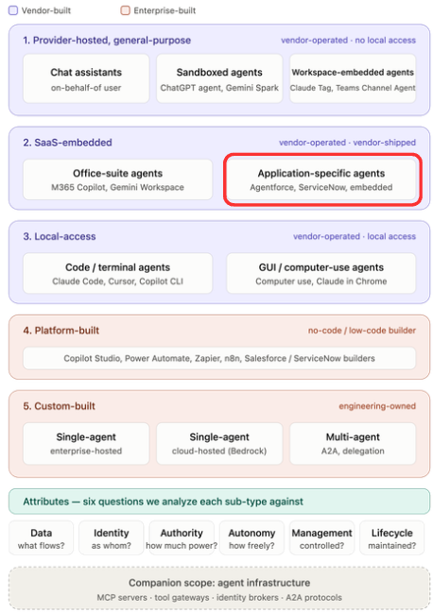
This article rounds out the SaaS-embedded category. Last time we covered the office suite agents in Microsoft 365 and Google Workspace, and today we take on what feels like practically every other SaaS application in the universe.
Given how straightforward it has become to build an agentic AI system, seemingly every SaaS vendor has shipped one. Their capabilities vary widely, tracking closely to what the underlying platform can already do. And, to keep our lives complicated, many of these platforms also bridge multiple categories in our taxonomy, shipping both pre-built agents and toolkits for building your own.
Salesforce is the clearest illustration. Salesforce’s Agentforce includes pre-built agents designed to help employees work within the platform, and it also offers Agent Builder for creating custom agents that run inside the Salesforce ecosystem. The former sits squarely in today’s category. The latter is platform-built, which we’ll cover in a future article. Same brand, same tenant, two different categories with two different control stories.
The SaaS application landscape spans large-scale platforms like Salesforce, Workday, and ServiceNow, along with more narrowly focused systems: Atlassian’s Jira and Confluence, Zendesk, Rippling, Box, Asana, Ramp, and many others. That second group is particularly interesting from a security standpoint: These tools are often procured by a department lead rather than central IT, they frequently hold sensitive data, and they may not be formally managed by infosec at all.
How these agents arrive
Enterprise customers of SaaS applications are accustomed to gaining features automatically as the platform updates. Minor UX changes, support for new workflows, occasionally entirely new capabilities. Nobody reads every release note. But new agentic AI features can show up unexpectedly, with significant security implications.
Atlassian’s Agentic AI capability, named Rovo, is a useful example of this. It was automatically enabled for paid customers, with an all-or-nothing administrative control covering all users. No deployment decision, no pilot, no phased rollout. It simply appeared.
This is the “mushroom” problem. Enterprises typically run many dozens of SaaS applications, and agentic features are appearing in a growing fraction of them, usually without any explicit decision by customers. Which means most security teams cannot confidently answer a fairly basic question: how many of our SaaS tools have shipped agents in the last year, and which ones are they?
At the other end of the spectrum sits Workday, and their approach tells us something about where this is heading. Rather than treating agent governance as just a configuration setting inside their own product, Workday actually recognized that this was a growing problem, and built the Agent System of Record as a separately licensed, general-purpose control plane: registering agents, defining their permitted actions, managing them from registration through retirement, and extending to third-party agents connecting through their Agent Gateway. A vendor sitting on the system of record for your employees looked at agent sprawl and concluded it warranted an entirely new enterprise product category.
Agent identity, which runs through everything else
Before we get to the six attributes, we need to talk about SaaS agent identity. It sits at the heart of nearly every attribute that follows, and it’s a concept infosec teams need to understand clearly and build controls around across their entire SaaS estate.
These agents may operate on behalf (OBO) of the user, or they may carry their own identity, authorization, and permissions. Which one applies often depends on the usage scenario, and it can get subtle. In all cases, it’s incumbent on you, in your enterprise infosec role, to prioritize understanding this, and to work to document and map how each of your SaaS platforms is being utilized and which model applies.
For instance, many of these agents are designed to augment individual users’ work, acting only in response to queries directed at them. Those are the easiest to reason about, and they typically act strictly on behalf of the requesting user. Other agents support scheduled or triggered workflows, and for those you need to know whether the platform runs them on behalf of a user or gives them their own identity.
Some platforms explicitly give agents their own identities and permissions. Their rationale is worth understanding, because it exposes real problems with the on-behalf-of model. It also decouples who can invoke an agent from what the agent is permitted to do, which is a significant shift.
Vendor Glean laid out the case for having a distinct agent identity clearly in a recent post, and their reasoning maps to four distinct problems with an on-behalf-of agent model:
The underprivileged agent: An agent acting strictly on behalf of the calling user may be too constrained to complete its assigned task. That can cause it to fail outright, or to get “creative” about how to achieve its goal, which introduces other problems.
The overprivileged agent: This is the mirror image of the previous problem. When a highly permissioned user invokes the agent, it suddenly holds far more access and authorization than the task requires. Given how unpredictable agents can be, that’s an open door.
Token expiration: Agents performing scheduled, triggered, or long-running work will run into expiring credentials. Tokens borrowed from users fail at inopportune moments, overnight or while someone is on vacation, and the work will simply stop…perhaps silently, or not-so-silently. Either is a problem.
Lost attribution: When agents act on behalf of a user, all their activity is logged as, and credited to, that user. This is a serious problem. We simply cannot have an audit trail indicating that Jane performed an action without being able to distinguish between what Jane actually did and what an AI agent did while operating as Jane.
Let me state that last point again, because it’s the one that matters most. Agents acting on behalf of users produce incorrect audit trails, and infosec cannot be responsible for allowing this.
So how do you tell which model a given agent needs? The discriminating question is whether the agent is designed to operate without a user prompt, when no human is necessarily present at execution time.
Agents supporting logged-in user questions and workflows are fine on behalf of the user. Agents handling incoming tickets, scheduled overnight work, or triggered workflows are not. Keep that test in mind, because it does double duty later.
With that foundation, let’s go through our six attributes.
Data
We begin with a question the previous article never had to ask: does this agent even exist?
In the office suite article, the agent was a known quantity. You licensed it, you decided to deploy it, and the work was governing what it could reach. Here, the agent may have arrived in a product update three weeks ago while nobody was watching. You cannot assess what an agent reaches until you know it’s there, and across dozens of platforms that’s an ongoing question rather than a settled one. Discovery needs to come first.
Once you find the agents, the data exposure story resembles the office suites. The issue is not third-party vendor access to your data, since you already made that decision when you put the data on their platform. The issue is that these agents can reach a far wider set of data and capabilities than the calling user knows about or would ever retrieve manually.
There’s an additional wrinkle unique to this category. Agents with their own identities are granted access by configuration, and that grant is often deliberately broad, because the vendor wants the agent useful to every customer out of the box. The result is a standing pool of access that anyone able to invoke the agent can draw on. That’s the same confused-deputy problem we discussed with workspace-embedded agents, except here it arrives through a vendor’s default configuration rather than anything your team designed.
Controls
- Platform-level agent enablement settings
- Per-agent data source scoping, where the platform offers it
- The underlying platform permission model
- DLP, where the platform supports it
- Audit logging of agent data access
Recommendations
- Inventory before you assess. You cannot govern what you have not found.
- For each platform, determine whether its agents run on behalf of users or with their own identity, and what data each can reach.
- Audit the vendor’s default scoping rather than assuming least privilege was the starting point.
- Prioritize by data sensitivity rather than vendor size. The departmental tool holding compensation data matters more than the large platform holding meeting notes.
Identity
This article’s intro covered why identity matters here. This section focuses on determining what you actually have and what to do about it.
The first difficulty is practical: vendor documentation is often vague, silent, or outdated on the identity model. You may need to ask your vendor’s customer success directly, or test the behavior yourself. Expect this to take longer than you’d like.
You’ll find three situations. Some platforms offer no choice and run everything on behalf of the user. Some offer no choice and give agents their own identity. Some offer both and someone in your organization needs to make a deliberate decision, which in practice means someone will accept the default unless you intervene.
Apply the execution-time test as your audit heuristic. Where no human is present when the agent runs, on-behalf-of is a finding rather than a configuration choice.
The cleanest illustration is a customer support platform. When a customer submits a ticket at two in the morning and an agent resolves it end to end, there is no user session to inherit. The person who triggered the work isn’t part of your organization and holds no permissions in your platform at all. The agent must operate under its own credentials. That isn’t a vendor preference; it’s forced by the architecture, and it explains why identity models in customer-facing platforms look fundamentally different from those in employee-facing productivity tools.
One caution worth carrying into your assessment. Distinct identity is necessary, but it isn’t sufficient. Watch for whether the agent’s identity actually fits the platform’s existing permission model, because when it doesn’t, the workaround is usually to loosen something else. We’ve seen a case where a platform’s agent identity sat outside the normal group and team structure, and the tactical fix was to broaden human users’ permissions so they could see the agent’s work, granting people visibility to more than they’d otherwise have had. The agent identity was correct in principle and under-modeled in practice, and the surrounding permission model bent to accommodate it.
Controls
- Platform identity configuration, where exposed
- Service account provisioning and scoping for distinct-identity agents
- SSO and IdP integration, where supported, for on-behalf-of agents
- Audit log configuration and retention
Recommendations
- Map the identity model for each platform and document it. This is the foundational work everything else depends on.
- Where the platform offers a choice, make it deliberately rather than inheriting the default.
- Where a platform runs autonomous work on behalf of users, treat that as a finding and escalate it.
- Verify that your audit trail can distinguish agent action from human action. If it can’t, document that gap in writing.
Authority
The answer depends on the agents’ identity type.
For agents operating on behalf of users, this matches the office suite article. Same authority as the user, no more and no less, but with far greater practical reach. The user could always have opened those records. They would never have opened all of them.
For agents with their own identity, that assumption breaks entirely. The question becomes what the vendor scoped the agent to by default, and the answer is usually “generously,” because a tightly scoped agent looks disappointing in a demo or POC.
Which gives our Authority attribute an uncomfortable answer in this category. Does the agent have more, less, or different authority than the person invoking it? Often more, and frequently neither you nor the invoking user knows how much.
That makes vendor default scoping something to audit explicitly. Look at what your vendor granted the agent before anyone in your organization asked for anything. Treat what you find as a starting position rather than a decision.
Controls
- Agent permission scoping within the platform
- Role and profile assignment for agent identities
- Approval gates on write or destructive actions, where offered
- The platform’s underlying authorization model
Recommendations
- Audit default agent scoping on every platform you run.
- Narrow agent access to what the task actually requires.
- Where a platform won’t let you scope the agent at all, weigh that against whether the agent should be enabled.
- Re-evaluate user permissions knowing an agent may now exercise them at machine speed and scale.
Autonomy
This category spans the widest autonomy range of anything in the taxonomy. An assistant answering a logged-in user’s question sits at one end, barely autonomous. A support agent resolving customer tickets end to end, or a role-based agent running a business process, sits at the other.
The practical consequence is that no blanket assessment is possible here, unlike the previous four articles. Each platform needs its own answer, and the same platform may well have agents at both ends.
Usefully, the same execution-time test applies. If no human is present when the agent runs, you have an autonomy question and an identity question, and they turn out to be the same problem viewed from two angles.
Controls
- Human-in-the-loop and approval requirements, where exposed
- Scheduled and triggered workflow enablement
- Scope limits on autonomous action
- Activity monitoring
Recommendations
- Assess autonomy per platform and agent instance
- Use the execution-time test as your trigger for deeper review
- Require approval gates for consequential actions where the platform supports them
- Where it doesn’t, weigh that against enabling the agent at all
Management
Every previous category in this series had one vendor, one admin console, one control surface. This category is a portfolio problem: dozens of vendors, dozens of consoles, and no common control plane across any of them.
The maturity gap between platforms is stark, and worth naming plainly. At one end, we have a vendor selling registration-to-retirement agent governance as a distinct enterprise product. At the other, an all-or-nothing toggle for every user in the tenant. Your control strategy has to be per-platform, because there is no uniform strategy available. And governance maturity is now a legitimate vendor selection criterion in a way it simply wasn’t a year ago.
Inventory is the foundational control here. Your SaaS register almost certainly needs a column it doesn’t currently have, tracking whether each platform has shipped agentic capability and what identity model it uses.
Two responses to this governance gap are emerging in the market. Platform vendors are building control planes for their own environments, with Workday’s Agentic System of Record a highly developed example, with comparable efforts underway at established vendors such as ServiceNow and Microsoft. Separately, a category of independent vendors is building cross-platform AI governance tooling, betting that the gap worth solving sits between platforms rather than within any one of them.
The tension between those two bets is worth understanding. If every platform builds its own control center, enterprises end up with a control plane per vendor, which is the same fragmentation problem relocated one layer up. The independents are wagering on exactly that outcome. It’s early, it’s contested, and nobody has won.
Controls
- Per-platform admin consoles and agent toggles
- SaaS inventory and discovery tooling
- Procurement and vendor management processes
- Platform audit and activity logging
- Agent-specific governance platforms (emerging category)
Recommendations
- Add agentic capability to your SaaS inventory as a tracked attribute.
- Assign clear ownership for monitoring agent features across the estate.
- Prioritize your attention by data sensitivity.
- Treat governance maturity as a vendor selection criterion going forward.
Lifecycle
The mechanism is the same capability creep we described for the office suites, but scale changes it qualitatively. Dozens of independent vendor release schedules, no coordinated notification, and no single place to watch. Rovo is the proof point: it arrived enabled rather than through any decision your team made, and it will not be the last.
Something new appears in this category too. Where platforms give agents their own identities, those identities need the same joiner-mover-leaver discipline as any other service account, and almost nobody is applying it. The fact that a major vendor is selling registration-to-retirement agent lifecycle as a product tells you both that the problem is real and that most platforms haven’t solved it.
Which raises the orphaned agent question we’ve hit in earlier articles, and it applies with particular force here. When the person who configured an agent leaves the company, or the team that owned it disbands, who owns that agent, its permissions, and its scheduled work? In a category where agents were often configured by a department lead outside central IT, that question may have no answer at all today.
Controls
- Agent registration and inventory, where the platform supports it
- Access review processes extended to agent identities
- Vendor release monitoring
- Deprovisioning processes
Recommendations
- Establish a recurring review of agentic features across your SaaS estate.
- Extend access reviews to cover agent identities and their permissions.
- Add agents and their scheduled work to your offboarding checklists.
- Establish clear ownership for every agent, and validate that ownership periodically.
Summary
The defining characteristic of this category is that these agents often arrive without a deployment decision. Nobody chose them, nobody piloted them, and in many cases nobody told you.
That makes discovery the precondition for everything else. You cannot govern what you have not found, and finding it means going platform by platform through an estate that probably has more SaaS applications in it than anyone has counted recently.
Identity determines nearly everything downstream, and the execution-time test gives you a practical way to sort it. If no human is present when the agent runs, on-behalf-of is not an acceptable model. It produces audit trails that attribute machine actions to people, and as we said earlier, infosec cannot be responsible for allowing that to happen.
The maturity gap between vendors means your strategy has to be per-platform, and it means governance capability now belongs in your procurement criteria. Tooling is emerging on both the platform-vendor and independent sides, but nothing has settled, and betting on any of it today would be premature.
None of this is exotic work. It’s inventory, identity mapping, permission auditing, and access review, applied to a new class of things. The hard part is simply that the new class of things keeps arriving whether or not you’re ready.
If you’d like some guidance, join us for a free 30-minute Agentic AI Security Workshop. We’ll review the taxonomy with you and help you apply these recommendations to your enterprise.
Next up: Local-access agents. Having worked through both SaaS-embedded sub-types, we move to agents that get a foothold on the endpoint itself, where the control surface shifts from the tenant to the device.
References and additional resources
- Glean on agent identity
- Atlassian’s Rovo administration documentation
- Workday’s Agent System of Record