
The Agentic AI Taxonomy, Part 4: Workspace-Embedded Agents

Welcome back to our series exploring the Numberline Agentic AI taxonomy, one category at a time. If you’re just joining us, you can read where we introduced the new taxonomy, then analyzed chat assistants and sandboxed agents.
In this installment we’re looking at workspace-embedded agents, which rounds out our discussion of the Provider-hosted, general-purpose grouping.
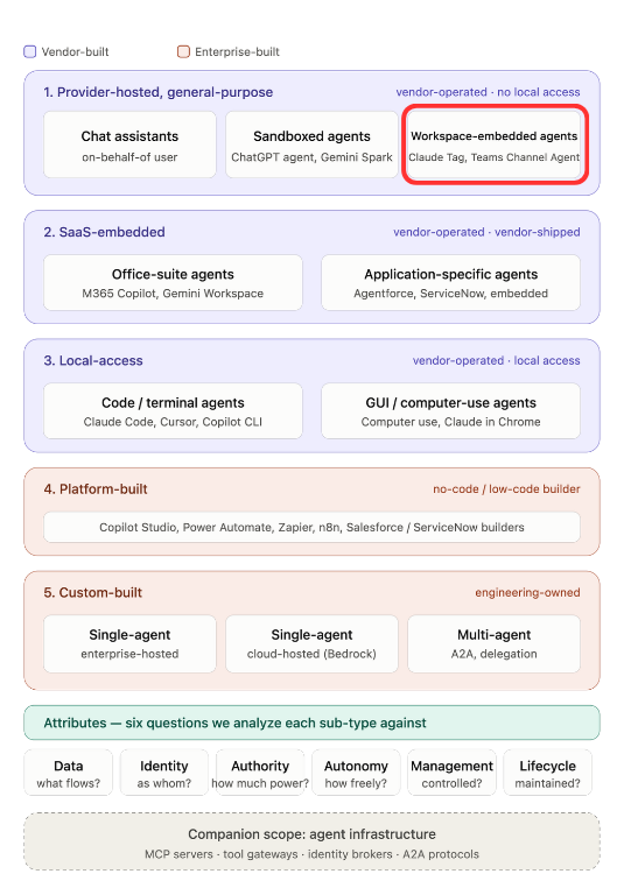
This type of agent represents a significant shift in agent autonomy and, well, agency. Our previous type, sandboxed agents, had some degree of autonomy: they could respond to an individual user’s requests and perform multi-step, long-running work without user involvement.
Workspace-embedded agents go further in two ways. They’re exposed to and available to multiple users at once, by nature of living in a shared workspace. And they can carry their own identity and access, which means a user can ask the agent to perform an action that the user doesn’t have direct permission to perform.
That last sentence is the heart of this article. It’s central to both the power and the risk of these agents, and it’s why enterprise security teams need to take the lead on how their organizations adopt them and to ensure that Zero Trust principles are applied.
These agents are showing up within messaging workspaces, most notably Slack and Microsoft Teams. That’s a natural fit; those platforms have grown into rich enterprise collaboration environments, exactly where a longer-lived, autonomous teammate is most useful. Let’s look at some examples to make this concrete.
Claude Tag. Recently introduced by Anthropic, Claude Tag lets a Claude agent be invited into an organization’s Slack channel as a full participant. The agent monitors channel context, responds to requests from any channel member, and can proactively take action. Claude Tag has its own identity, provisioned by an admin, and Anthropic used the launch to introduce its broader agent identity access model. The shift they describe from “single player” to “multiplayer” is another way of saying that because the agent interacts with multiple users, it must carry its own identity and its own permissions, and an autonomous agent has to be managed as a first-class identity.
Microsoft Teams Channel Agent. Currently in preview, the Teams Channel Agent joins a Teams channel and supports similar interaction patterns. Microsoft made a different design choice on permissions, though: the Channel Agent operates on behalf of the requesting user for a given operation, and asks for confirmation before sharing results that other channel members can’t directly access. Hold onto that contrast with Claude Tag. We’ll come back to it under Authority and contrast these two products on this key aspect.
ChatGPT Workspace Agents, a boundary case worth understanding. OpenAI’s Workspace Agents look like they belong in this list: named agents that live in a workspace, run in Slack, and serve multiple users. But under our taxonomy they’re actually a different animal. They are not technical provider-built; your own users build them, configuring tools, skills, and schedules on OpenAI’s builder, which makes them enterprise-authored agents on a vendor platform and therefore in our Platform-built category. We include them in this analysis anyway because they share this sub-type’s user-interaction model and identity challenges, and because their identity model is instructive: for each connected app, the builder chooses whether the agent authenticates as the end user (each person connects their own account) or through an agent-owned account, where OpenAI recommends a service account. One agent can mix both modes across its connectors. Note the resulting expansion of access with agent-owned connections: the service account’s access becomes available to every user who can invoke the agent. We’ll analyze this type fully in our future Platform-built article.
One more note before the analysis. The ability to control what a given agent can access depends heavily on the specifics of the AI platform and the workspace platform in use (which would be good topics for future deep-dive articles). It’s also an excellent argument for pushing your enterprise to centralize on one primary AI and workspace platform. Do that, and your team can deeply learn how your chosen platforms actually work, then build the tools and processes to enforce controls appropriate for your enterprise.
With that foundation, let’s look at these agents across our six attributes.
Data
These agents typically have access to the full set of data in a given channel or workspace: every message and file posted becomes a potential input to the agent’s analysis. In many deployments they also reach a wide variety of connected systems, including file repositories, code repositories, email, and other enterprise applications.
Outputs flow the other way, and by design they’re visible to all members of the channel. That’s the collaboration point. But an agent operating on behalf of one user may return direct or summarized results that were never intended for the full channel, which is why the Teams confirmation prompt exists.
Two risks here are unique to the multiplayer setting and deserve your full attention.
The first is prompt injection at channel scale. With a single-user agent, the prompt surface is one person. In a channel, the prompt surface is every member, plus every document, message, and link anyone posts. A malicious participant, or malicious content pasted by a well-meaning one, can attempt to steer an agent that holds broader authority than the person who planted the instruction. This is a classic confused-deputy problem, and it’s the security-native reason that channel membership hygiene matters as much as agent configuration.
The second is context boundaries. If your platform’s agent retains context or memory, understand exactly where its boundaries sit. Can something the agent learned in the Finance channel surface in a general channel? Platforms answer this differently (OpenAI, for instance, scopes workspace agent memory per user and per agent rather than shared), so verify your platform’s model before trusting the compartment.
Controls
- Configuration of whether a workspace agent operates as its own identity or on behalf of the requesting user
- Limits on read access to specific data, applications, and actions
- Detect or block sensitive content leaving corporate-managed devices (endpoint control)
- Detect or block sensitive content within the workspace environment (workspace control)
- Definitions of which identities and roles can access which data across SaaS platforms
- Platform mechanisms that ask users to confirm sharing of limited-visibility data during agent interaction
- Classification of workspace data, and how data flows through (or doesn’t) into agent and tool usage
Recommendations
- Clearly define and enforce controls around these agents, based on an ongoing understanding of how they work and where the risks sit.
- Deliberately decide and communicate whether agents operate on behalf of users or with their own access.
- Develop a joint process for data owners and infosec to decide which data these agents should and should not reach.
- Validate channel membership, especially for channels dedicated to sensitive functions. HR, Finance, Legal, and incident response spaces should have both user and agent access explicitly reviewed. Remember that every member is part of the agent’s prompt surface.
- Understand your platform’s agent memory and context boundaries between channels before relying on compartmentalization.
- Educate users on an ongoing basis about the ways these agents can inadvertently amplify access to data and actions
- Understand and define guardrails for the amplification of user access, through more broadly-permissioned agents, or agents utilizing other user roles
Identity
Workspace agents may carry their own identity, or may operate on behalf of the user interacting with them at a given moment. In our opinion the trend is toward distinct agent identities. As we’ll see in future articles, that’s clearly where the other agent types are heading, so it’s worth building your understanding and controls around agent identity now, to ensure alignment with Zero Trust best practices.
Today’s workspace agents have internal identities defined and managed within the AI or workspace platform by an administrator. They are not defined in your enterprise identity provider. That’s an important distinction, because the operational and governance machinery you’ve built for standard user and non-human accounts doesn’t automatically apply to them.
When an agent operates under its own identity, it also needs service accounts in each external system it accesses. Those service accounts are traditional identities, provisioned and governed by your standard processes and tools, and we’ll return to them under Authority. (Agents operating on behalf of users ride the user’s permissions instead, and need no service accounts of their own.) Configuring an agent’s service account connection is a manual administrative step, and connecting an agent to a personal user account for external access is an antipattern to be avoided. OpenAI says as much in its own documentation, warning that a personal-account connection shared with others can inadvertently expose that account’s data to everyone who invokes the agent.
There’s an upside to distinct identity worth naming, because it’s easy to miss amid the risk discussion: attribution improves significantly with agent-specific service accounts. When an agent acts through its own service account, its actions land in each external system’s logs under that account, cleanly separated from human activity. An on-behalf-of agent’s actions masquerade as the user’s. Distinct identity done properly gives your detection and audit teams something missing with OBO agents: a clean line between what the human did and what the agent did.
Controls
- Administrative configuration of workspace agent identity within the AI platform
- Determination of identity mode, distinct versus on-behalf-of, where the platform offers the choice
- The number and type of service accounts in external systems (driven by authorization scope, below)
Recommendations
- Prioritize infosec time to deeply understand how your platform’s workspace identities are configured and how they connect to external system accounts.
- Develop best practices and repeatable patterns for agent service account creation, ownership, and management, then standardize on them.
- Err on the side of more service accounts, rather than fewer. This provides you with the ability to narrowly define permissions for each account, as well as obtain higher-fidelity logging and attribution.
- Determine how you’ll monitor and govern this access on an ongoing basis.
Authority
Agent authorization is the key area of concern for workspace agents, and the one we predict will become the biggest headache for enterprise security teams. The reason is that workspace agent authorization is new, different, and nuanced.
Let’s start with the structural issue: agent access is configured across multiple systems. The agent is created in the AI platform and assigned to areas of your workspace, say, specific Slack channels. It’s then connected to service accounts in whatever external systems it needs. Platform-side controls vary for example: Claude Tag scopes access through channel-level profiles, Teams enforces the requesting user’s file permissions, and OpenAI offers role-based controls and write-action safeguards. But the enforceable, fine-grained authorization within each external resource ultimately lives in the service account’s permissions inside that system. That’s the primary control that you need to understand and get right.
Here’s where the vendor design choices we mentioned earlier reappear: Claude Tag and the Teams Channel Agent answer the central question in opposite ways. That question, straight from our Authority attribute definition is: does the agent have more, less, or different authority than the person asking it to act? Claude Tag scopes the agent’s authority to the channel compartment, so a channel member can have the agent reach a resource they can’t access directly, provided the channel’s profile grants the agent that permission. Microsoft ties the Channel Agent’s effective authority to the requesting user’s own permissions, preventing access to data the requester couldn’t open themselves. Neither choice is wrong. Claude Tag’s model delivers more of the multiplayer value and demands more careful compartment management; Microsoft’s is more conservative and quietly gives up some of the “agent as shared teammate” power. What matters is that you know which model your platform uses, because your controls differ accordingly. The general lesson for this sub-type: assess Authority as what can the agent do in this compartment, not what can this user do.
Now a potential pitfall: We’re concerned that enterprises will inadvertently grant these agents far broader access than needed by taking the easy path: one service account shared by all workspace agents. That account inevitably accumulates the union of every agent’s access, and you lose the ability to restrict any individual agent. You also lose attribution, because every agent’s actions now land in the logs under the same account, erasing the audit benefit we just described. You’ll need multiple service accounts, ideally one per agent or per use case, to enforce least privilege (or, as it’s becoming known, least agency). It’s more work, but it’s also the only way this model stays controllable.
Controls
- Creation and assignment of channel-specific workspace agents
- Association of agent connections to external resources via service accounts
- Service account permissions within each external resource
Recommendations
- Communicate how these agents work to everyone in the workspace. We particularly like having the agent itself remind users of its scope and permissions on a regular cadence.
- Proactively educate users about how AI agents operate in general, what they should be used for, and where the risks are.
- Define controls and processes around who can create channels, and manage agent allocation to channels deliberately.
- Keep tabs on channel topics and usage, so highly privileged agents don’t drift into basic tasks.
- Use multiple service accounts, ideally one per channel or use case, to enforce least agency and preserve per-agent attribution in your logs.
Autonomy
These agents are autonomous, acting not only in response to direct prompts and mentions but also when they judge it appropriate based on activity and data in the shared workspace. Agents from different providers behave differently here, and expose different levers for controlling the degree of autonomy within a channel. The controls below are generic; the specifics belong to your platform.
Controls
- Whether and how agents proactively take action based on channel activity
- Which users in a channel may interact with a given agent (sometimes a security control, sometimes simply a function of AI platform licensing)
Recommendations
- Evaluate and understand your provider’s capabilities for controlling agent autonomy.
- Define allowed configurations and standardize them across your environment.
Management
These are the first agents in our taxonomy that the enterprise administers as an asset. With chat assistants and sandboxed agents, you governed user access to a vendor’s service. Here, you provision the agent itself: its existence, its identity, its channel assignments, and its access. That’s a different job, and it demands active coordination between IT and infosec.
Given how powerful and easy to use these agents are, we anticipate rapid adoption. That makes this an excellent starting point for establishing secure AI practices, aligning with IT on provisioning and configuration processes, and engaging end users. These agents should be fully under enterprise management, with the caveat that some aspects may not yet be exposed for management by the platform. Platform maturity varies: OpenAI’s workspace agents, for example, ship with a Compliance API covering every agent’s configuration and runs, admin suspension, role-based build and share permissions, and an off-by-default posture for Enterprise workspaces. Know precisely which of these your platform offers, because the gaps define your blind spots.
Controls
- Creation and configuration of workspace agents within the AI platform
- Creation and configuration of agent service account permissions within external resource platforms
- Guidelines and controls around user access to channels containing agents
- Platform telemetry, audit APIs, and suspension capabilities where available
Recommendations
- Collaborate with IT to inventory and track workspace agent usage.
- Collaborate with the business to identify (human) processes owners for the relevant Agents, and make them responsible for the agent governance
- Define guidelines for, and monitor, user participation in agent-enabled channels.
- Log and analyze agent activity to establish patterns, detect anomalies, and track token usage costs.
- Iden
Lifecycle
Lifecycle here is closely tied to management, and should be woven into your identity and access governance processes. Some of it maps naturally onto how you already handle service accounts. If your organization’s service account discipline is immature, this is a genuine opportunity to improve it, with business adoption of these workspace agents as a convenient forcing function. Other parts, particularly lifecycle activities for the agents’ identities inside the AI platforms, will be new. Use the moment as a catalyst to define those processes now, while the population is small.
One item deserves specific attention: recurring work. These agents can be configured to run on schedules and act on channel activity indefinitely. When the person who configured an agent leaves the company, or a channel is archived, who owns the agent, its service accounts, and its recurring tasks? Your offboarding and decommissioning checklists should have an answer.
Controls
- Identity lifecycle activities for agent identities: creation, modification, and decommissioning, akin to the classic joiner-mover-leaver flow for users
- Access request and provisioning processes
- Access review processes and follow-up changes
- Logging and monitoring of scheduled and recurring agent activities
Recommendations
- Define processes for requesting and provisioning workspace agents.
- Define processes for requesting and provisioning their service accounts in SaaS platforms.
- Clearly establish ownership of agents and their service accounts, with ongoing validation and monitoring.
- Add agents, their service accounts, and their scheduled tasks to your offboarding and channel-decommissioning checklists.
- Approach agent lifecycle from a continuous governance perspective, aiming to have ongoing signals and events that adapt the agent’s lifecycle
Summary
Starting now, we have to expect that these types of agents will only get more capable and more widely used in our enterprises. Chances are, your users are already experimenting with them, and it’s worth remembering that agents in workspace conversations aren’t entirely new. Bots and assistants have lived in 1:1 chats for years, but strictly on behalf of the user. What’s changed is everything this article has been about: agents with their own identity and access, serving many users at once, able to do things the requesting user cannot do directly.
That capability demands knowledgeable, thoughtful identity work. These agents sit at the intersection of the AI platform and the SaaS systems they access, and proper configuration requires understanding both security models and how they interact. It’s unfortunately easy to get wrong, and the vendors know it. OpenAI’s own documentation warns against personal-account connections and recommends scoping agent access down to only what the job requires, precisely to limit inadvertent data exposure. Doing that well requires knowing what the agent’s job actually is, which means the only effective path runs through collaboration with business users and data owners.
Zooming out: these agents are poised to bring real value to enterprises, and they can be well-managed and well-secured. Don’t be intimidated. Take it one step at a time, starting with the identity and service account foundations above.
If you’d like some guidance, join us for a free 30-minute Agentic AI Security Workshop. We’ll review the taxonomy with you and help you apply these recommendations to your enterprise.
Next up: SaaS-embedded agents. With all three provider-hosted, general-purpose sub-types covered, we shift categories. Our next two articles take on SaaS-embedded agents, starting with the office-suite agents your users already have.
References and additional resources
- Anthropic’s Agent Identity access model
- Anthropic’s documentation on Claude Tag security and data controls
- Microsoft’s guidance on setting up a Teams Channel Agent
- OpenAI’s workspace agent security overview
- Anthropic’s CISOs Guide to Agentic AI