
The Agentic AI Taxonomy, Part 7: Code / Terminal Agents

Welcome back to our series exploring the Numberline Agentic AI taxonomy, one category at a time. If you’re just joining us, you can read where we introduced the new taxonomy, then analyzed chat assistants, sandboxed agents, workspace-embedded agents, office suite agents, and application-specific SaaS agents.
Today we shift categories again, to local-access agents. These are vendor-built agents that users install on their own devices, and which have access to local and connected resources. The category has two sub-types: Code / Terminal agents, our subject today, and GUI / Computer-Use Agents, which we’ll cover next time.
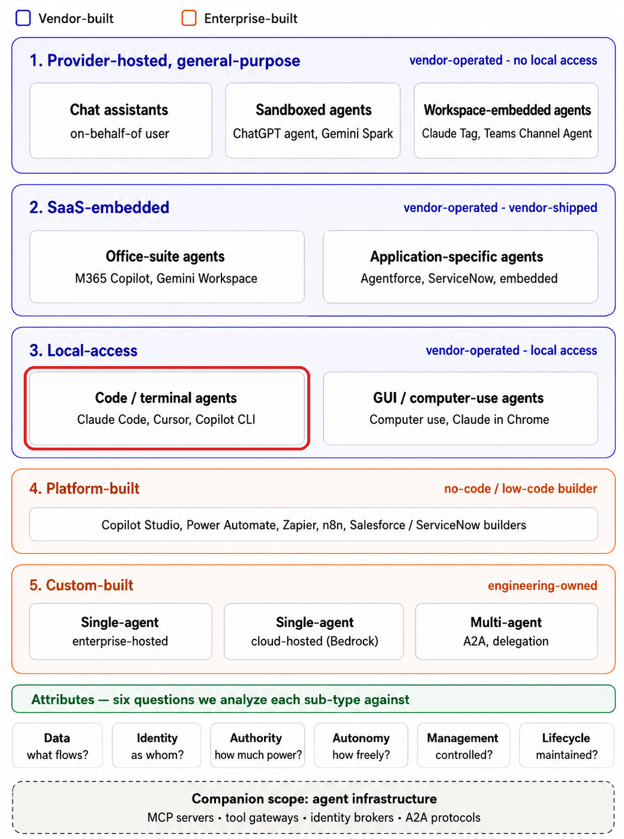
Before we go further, let’s talk about the category name, Code / Terminal Agents. This reflects the original focus of that class of tool, but as of today it to some degree undersells what these agents do now. What actually defines this sub-type is not the audience but the interface. These agents act through the shell and the filesystem. Next week’s sub-type acts through the screen and the input layer. This difference matters because the two interfaces have very different security properties, and they need different controls.
One more thing we need to highlight up front. These agents often write code, and code executes. A risky outcome doesn’t stay on the endpoint where it started, it propagates. That potentially-disturbing fact is why this type of agent deserves focused attention by the security team.
What These Agents Are
Code / Terminal agents have local filesystem and operating system access, meaning they can read and modify files, and run shell commands. They are typically granted permission to modify files directly, as well as indirectly through OS commands.
They excel at file manipulation, which covers source code analysis and generation, but also configuration files, log analysis, and the broad category of technical text work. They also carry their underlying AI platform’s full capabilities: image generation, external system access, and integration with components like MCP servers.
The examples divide usefully into two groups. The command-line tools, such as Claude Code, Codex CLI, Copilot CLI, and Gemini CLI, live entirely in this sub-type. The desktop applications, Claude Desktop, ChatGPT Desktop, and Gemini for macOS, do this work too, and they can also drive the endpoint’s browser and local applications, which means they will reappear next week wearing the other hat.
That overlap is important. An endpoint sees one binary from one vendor. Whether that process is doing filesystem work or driving a user interface changes over time, and security tooling typically cannot distinguish them.
But…Not Just For Developers
The agent desktop applications we mentioned above (Claude Desktop, ChatGPT Desktop, and Gemini for macOS, among others) deserve their own discussion, because they illustrate the point that agents in this category are in use by a huge variety of user types. Specifically, the people running these desktop applications are frequently not developers.
Enterprise users are utilizing them every single day for scenarios such as:
- A finance analyst connecting the desktop app to a folder of spreadsheets so it can reconcile them
- A legal team pointing it at a directory of contracts
- A marketing manager granting access to their documents folder and office suite data as well, because the productivity gain from letting the agent see email and calendar is obvious and immediate
- A product manager directing the agent to their Downloads folder to examine the contents of every file, for help organizing
We covered the office suite connection in Part 5, and everything we said there about the agent reaching far more than the user would ever retrieve manually applies here, with local filesystem access layered on top. And the permissions grant itself is usually made once, early, in the interest of getting work done, and rarely revisited.
Note that there is often going to be a governance asymmetry about this. Engineering organizations generally have some constraints about what runs on developer machines, along with some existing tooling to enforce them. A finance or legal endpoint often does not have such constraints. This results in the same filesystem and shell reach, in the hands of someone who does not think of themselves as running anything technical, on a device nobody was watching for this.
To the Cloud, and Back Again
Another interesting property of this category is that execution location has become fluid. For example, Claude Code supports moving workloads to Anthropic’s cloud environment, and sessions can even move in both directions, from desktop to cloud and back, while work is in progress. Codex offers cloud execution as well. This is genuinely useful, but it also means the boundary you configured locally may not be the boundary that applies. We also see multiple situations where local controls differ from cloud controls, and a workload moving between those environments will have its permissions change mid-stream.
Anthropic documents the consequence plainly, and makes a great example illustrating this point. A cloud session can access any repository the connecting GitHub account can see, not just the specific repositories where the Claude GitHub App was connected. To restrict what an agent can reach from cloud sessions, you have to restrict its overall access on GitHub itself, by scoping down team or repository access for the connected accounts.
Read that carefully, because it’s tied to an important lesson we need to take from this article. The general lesson is that we cannot assume that when a workload shifts between local and cloud-based execution, its access permissions will remain the same. It’s imperative that we fully understand (and test) any differences between environments, and build some process or technical controls around them. You should recognize that for this type of agent, at this point in time, where the work runs is a runtime property, not a deployment decision.
Vendor Security Models
The good news is that the major vendors have invested seriously here, and the models are worth comparing because they differ.
Codex has two separate dials: A permission profile determines what the agent can technically do, with built-in options of read-only, workspace, and danger-full-access. An approval policy determines when it must stop and ask. Network access is off by default in workspace mode and requires explicit opt-in. This two-part design is a thoughtful piece of engineering and worth noting approvingly.
Claude Code defaults to read-only permissions, with a built-in set of safe commands like ls and git status running without a prompt. Writes are restricted to the folder where the session started and its subfolders, with parent directories requiring explicit permission, and the session has filesystem and network isolation.
Gemini for macOS takes a simpler approach, where it’s only permitted to access the specific directories a user explicitly connects. Notably, broader access depends on granting the app certain macOS permissions, which is an operating system control sitting entirely outside the vendor’s own model.
One shared insight is worth calling out. Both Anthropic and OpenAI have explicitly recognized that permission prompts get rubberstamped when there are too many of them. Anthropic names “prompt fatigue mitigation” as a design goal and supports allowlisting common safe commands per user, per codebase, and per organization. Your developers were always going to click allow. The vendors know it, and have started designing around it rather than pretending otherwise.
With that foundation, let’s go through the six attributes.
Data
Let’s begin with what makes this category different from everything before it. These agents produce code, and code runs.
In previous categories, a successful prompt injection produced a bad answer, an unwanted message, or data sent somewhere it should not have gone. Here it can produce a commit. That commit persists in your repository, flows through your pipeline, and executes in environments far from the laptop where it originated. The blast radius extends well past the endpoint, and it extends forward in time.
This is, effectively, a supply chain concern rather than just an endpoint concern, and it is the reason this sub-type deserves focused attention.
On access itself, the defaults are better than one might assume. Claude Code starts read-only and bounded to a working directory. Codex ships with a workspace-scoped profile and network access off. Gemini requires explicit directory connection. Default-deny is the norm. The problem is what happens next. Users naturally grant broad access, because narrow access is inconvenient and the work needs doing. Developers point the agent at whole repository trees. Desktop app users connect entire documents folders and, frequently, office suite data. The vendor’s careful default survives about as long as the first task that bumps into it.
Then there is the process itself. Whatever the agent reads becomes context, and context includes files nobody thought of as instructions. Both Claude Code and Codex read project instruction files automatically at session start. Anything in the repository can shape what that agent, or future agents, do.
Controls
- Default-deny permission models and working directory boundaries
- Sandboxed execution modes with filesystem and network isolation
- Network access controls, off by default in the stricter profiles
- Organization-level managed configuration that user settings cannot broaden
- Endpoint DLP and data classification
Recommendations
- Treat agent-generated code as untrusted input to your pipeline, with the same review and scanning you would apply to any external contribution.
- Set organization-level permission defaults rather than letting each user decide. All the major AI platforms support managed configurations; learn them and use them.
- Scope filesystem access to the directories a task actually needs, and revisit those grants rather than treating them as permanent.
- Extend your data classification thinking to local endpoints. The agent reaching a folder of contracts is a data exposure event whether or not anyone filed it as one.
Identity
These agents act on behalf of the user, and locally that is unambiguous. The agent runs as the user, with the user’s filesystem permissions and the user’s shell.
Remote access complicates it. When the agent reaches a source control system, an issue tracker, or a cloud service, the identity depends on how that connection was configured. It may be the user’s account. It may be a separate account created for the purpose. When the session moves to the vendor’s cloud, the authentication may be different again, and the practical scope may differ from what the local session had. For business users, the equivalent connected account is their office suite tenant rather than a source control account, and the same question applies to it.
That last point is the one to internalize. Identity in this category is not a single answer but a set of answers that vary by resource and by execution location, and the same session may have different effective identity at different moments. On the surface this may sound like an excuse for imprecision, but the reality is that for this aspect, there’s no substitute for deeply understanding how your chosen AI platform specifically operates.
Controls
- Operating system user permissions, which bound the local case entirely
- Source control account scoping and repository membership
- Credential storage in OS secure storage
- Scoped proxy credentials for cloud sessions, where the vendor implements them
- Managed configuration governing which authentication methods are permitted
- Delegated / Agent account permissions
Recommendations
- Document, per platform, what identity the agent uses for each class of resource it touches. Local, remote, and cloud-session cases may all differ.
- Constrain access at the source system rather than at the agent, since that is the boundary that survives an execution location change.
- Review what accounts your developers have connected to their agents, and whether those accounts are scoped to the work.
Authority
Acting on behalf of the user means the agent holds the user’s permissions. In this category, that is almost certainly too much for any given task.
The structural problem is that nobody scopes down per session. Granting command-line permissions repeatedly gets tiresome, productivity suffers, and developers grant broad access to keep working. This is not a failure of discipline. It is the predictable result of a control that asks a busy person the same question forty times a day, and as noted above, the vendors have accepted this and built allowlisting rather than fighting it.
The cloud handoff makes it concrete. A developer configures the Claude GitHub App on the three repositories their team owns, reasonably believing that scopes the agent. Then a session moves to the cloud, authenticates as their GitHub account, and can reach every repository that account can see. Nothing was misconfigured. The control simply did not mean what it appeared to mean. And. the same problem exists outside engineering. A business user’s over-permission is not repository sprawl but the accumulated reach of their office suite account, which we covered in Part 5. The agent inherits it, and there is no equivalent of repository scoping to reach for.
Controls
- Permission profiles and approval policies, set at the organization level
- Working directory and workspace boundaries
- Source code repository restrictions on cloud session pushes
- Source system access controls, which are the boundary that actually travels
- Office tenant reach for the user account
Recommendations
- Audit what your agents can actually reach, particularly through source control accounts, rather than what you believe you scoped.
- Use organization-managed configuration to set floors that individual users cannot lower.
- Prefer allowlisting known-safe operations over relying on per-action prompts, because the prompts will be approved.
- Constrain at the source system for anything that matters, since agent-side configuration may not apply after an execution location change.
Autonomy
These agents are semi-autonomous. They begin their work in response to user action, then run. This can potentially be extended multi-step work with limited supervision. They also support scheduled tasks and long-running operations, executing either locally or in the provider’s cloud.
The control that matters most here is the permission mode, and it deserves more attention than it gets. Claude’s Cowork sessions, for instance, offer three modes: manual approval for each action, automatic approval with a per-action safety review that checks for things like exfiltration and prompt injection, and skipping approvals entirely. Codex separates the same concern into an approval policy alongside its permission profile.
The important property is that these are per-session settings. The same tool, on the same machine, in the hands of the same person, carries materially different risk depending on a dropdown that most users treat as a speed control rather than a security control. Your policy needs a position on that, and your users need to know what the position is. We all know what the default user action is going to be: “approve all”. It’s extremely unlikely that any user would review every agent-generated command line before allowing it to execute. So we need to expect this, and put in place additional controls and detections around this.
Controls
- Approval policies and permission modes, ideally set at the organization level
- Scheduled task configuration
- Sandboxed execution for autonomous operation
- Activity logging and telemetry
Recommendations
- Define which permission modes are acceptable for which classes of work, and set them through managed configuration rather than guidance.
- Treat skip-all-approvals as a mode requiring justification, not a default. But do anticipate that realistically it will be demanded by users.
- Inventory scheduled agent tasks, which run whether or not anyone is watching.
Management
The vendors have invested real effort in enterprise controls here, and the depth is impressive. OpenAI offers role-based access control, managed configuration that constrains what individual users can loosen, and Lockdown Mode, an advanced setting that limits outbound network requests specifically to reduce data exfiltration risk from prompt injection. Anthropic offers managed settings, organization-level allowlists, telemetry monitoring, and hooks that can audit or block configuration changes mid-session.
These are good controls. They also require the enterprise to invest real time in understanding them, mapping them to specific user and group requirements, and adapting them as the products change. The easy path is to allow everything, and that rarely turns out well.
Here is why the investment matters, and it is not a criticism of any vendor. Lockdown Mode enforces strict controls, but does not affect network access in Codex. So the control built specifically to limit exfiltration after a prompt injection does not extend to the coding agent, which is precisely where, as we argued above, a successful injection has the longest reach.
That gap is documented, it is presumably deliberate given how differently Codex handles networking, and it may well be closed at some point. The point is not that OpenAI made a mistake. The point is that finding a gap like that requires someone on your team to have read both the Lockdown Mode documentation and the Codex documentation and to have noticed that the second is exempt from the first. That is a real investment of attention.
This example is a clear argument for standardizing on one AI platform (or at most, two). Going deep on one vendor’s security model is achievable. Doing it for three or more, across products that ship changes monthly, almost guarantees that a subtle but important gap goes unnoticed.
There is also an endpoint problem that most organizations have not adjusted for. These agents are semi-autonomous processes running on user devices, and their activity looks nothing like user activity. Rapid file enumeration, bulk modifications, shell commands issued faster than a person could type, network connections from a process users did not consciously invoke. Your EDR tooling and SIEM analytics were tuned for humans and malware, and this is neither. Expect false positives as legitimate agent work trips behavioral rules, and expect false negatives as analysts learn to dismiss that noise. Both directions are dangerous, and the second is worse.
Controls
- Role-based access control and managed configuration on the AI platform
- Organization-level permission floors that users cannot lower
- Device management controlling whether these applications can be installed at all
- Endpoint detection and response, retuned for agent behavior
- Telemetry and monitoring where supported
Recommendations
- Standardize on one platform, or at most two, and invest the time to understand its security model completely. Create an internal Center of Excellence, and foster regular information sharing and lessons learned from mistakes.
- Map platform controls to actual user and group requirements rather than accepting defaults in either direction.
- Retune endpoint detection for agent activity, and give your analysts a way to distinguish sanctioned agent work from everything else.
- Revisit your configuration on a schedule, because these products change monthly and your assessment ages.
- Use device management to control installation, particularly outside engineering.
- Understand that your endpoint tooling will see a single agent process, often with no way to determine whether it is reading files or driving the user’s browser. Scope your controls for both, and expect your detection rules to face the same ambiguity.
Lifecycle
There is no agent identity to provision or decommission here, since these agents act as the user. But the agents leave artifacts behind, and those artifacts have a lifecycle nobody is managing.
The first is dependency. Because the agent’s lifecycle is bound to the user’s, a departing employee can inadvertently break processes that other people depend on. A scheduled agent task, quietly producing a weekly report or maintaining a data pipeline, stops when the account is disabled. Often nobody knew the dependency existed until it failed. This is the availability version of the offboarding problem, and it is easy to miss without good governance. Note that this is true for both developer and non-technical users. They can both set up scheduled agent tasks that get inadvertently baked into downstream processes.
The second is credentials and sessions. Agents store credentials in the operating system’s secure storage and hold live authenticated sessions to source control. Wiping a laptop handles the local copy. The authorizations granted on the source system side are a separate cleanup with a separate owner.
The third is new, and we think it is the most interesting. These agents read project instruction files automatically at session start, AGENTS.md for Codex and its equivalent for Claude Code. Those files sit in repositories and folders. They drive the behavior of any agent that operates in that directory. They were written by someone who may have left the company (or their agent at the time). Nobody thinks of them as configuration, so nobody reviews them, and they have no owner and no expiry.
Call them orphaned instructions. They are the agentic cousin of the orphaned account, with one difference that makes them worse. An orphaned account sits dormant until someone abuses it. An orphaned instruction executes every single time an agent opens that directory.
It follows that these files are also an injection surface. Anyone who can commit to a repository can shape what every future agent does in that repository. It is worth noting that OpenAI appears to have recognized this, since Codex keeps its own configuration and instruction directories read-only even when the workspace is writable. Protecting the instruction files from the agent is a sensible instinct. Protecting them from the humans who can commit to the repo is your job.
Controls
- Identity lifecycle processes covering connected source control accounts
- Credential rotation and revocation at the source system
- Source control review processes applied to instruction files
- Scheduled task inventory
Recommendations
- Map scheduled agent tasks and their business dependencies before someone leaves, not after.
- Add agent authorizations to your offboarding checklist, especially source control connections, which live on the platform rather than the laptop.
- Treat agent instruction files as configuration under change control. They should have owners, they should be reviewed, and changes to them should go through the same scrutiny as changes to code.
- Include instruction files in code review. A change to how every future agent behaves in a repository deserves at least as much attention as a change to a function.
Summary
Two things make this sub-type different from everything we have covered so far.
The first is that its output often gets executed. Code the agent writes persists in your repositories, moves through your pipeline, and runs in places far from the endpoint where it was generated. Combined with instruction files that shape agent behavior for everyone who follows, this is the one category where a problem introduced today keeps acting on its own tomorrow.
The second is that the audience is broader than the name suggests. Desktop applications have put filesystem and shell reach in front of finance analysts and legal teams, on endpoints that were never governed with this in mind.
The vendors have done serious work on controls, and the models are thoughtful. But they are also complex, they differ meaningfully from each other, and they contain the kind of subtle gap that only shows up when someone reads two documents and notices that the second is exempt from the first. That is the case for going deep on one platform rather than shallow on several.
If you’d like some guidance, join us for a free 30-minute Agentic AI Security Workshop. We’ll review the taxonomy with you and help you apply these recommendations to your enterprise.
Next up: GUI / Computer-Use agents. This scenario is driven by the same user desktop applications, using another interface. Where this article dealt with the shell and filesystem, next time we take on agents that drive your screen, your mouse, and your keyboard, and the rather different problem of governing something whose actions look exactly like yours.
References and additional resources
- Claude Code security documentation
- Claude Code on the web
- Codex agent approvals and security
- ChatGPT enterprise admin setup
- ChatGPT managed configuration
- OpenAI Lockdown Mode
- OpenAI role-based access control
Schedule a Free 30 Minute Agentic AI Workshop
Map your footprint, identify your highest-risk gaps, and leave with a customized security summary